
Py: 12. Basic ATM Functionality


Just Giving it a try for the basic functionality of an ATM, Here I came up with some nasty bunch of code hope will help you in understanding the basic concept of programming in py.

Step 1:  Just Copy paste the code below in a file and save it with extension .py

def atm():
    print("Welcome to HDFC Bank ATM");
    pin= int(input("Enter 4 Digit PIN:"))
    base_amount=10000;
    choice=0;
    update_amount=base_amount
    while(choice!=3):
        if(pin==1111):
            print("Welcome Mohit");
            if(choice==0):
                print("Your Account Balance is:",base_amount);
            print("Enter Your Choice to continue:");
            choice= int(input("1 For Deposit \n2 For Withdrawl \n3 For Exit:\n"))
            if(choice==1):
                amount_to_deposit= int(input("Enter the amount to be deposited:"))
                update_amount=update_amount+amount_to_deposit;
                print("Amount updated and the New Amount is:",update_amount);
            if(choice==2):
                amount_to_withdrawl= int(input("Enter the amount to be withdrawl:"))
                update_amount=update_amount-amount_to_withdrawl;
                print("Amount updated and the New Amount is:",update_amount);
   
atm();
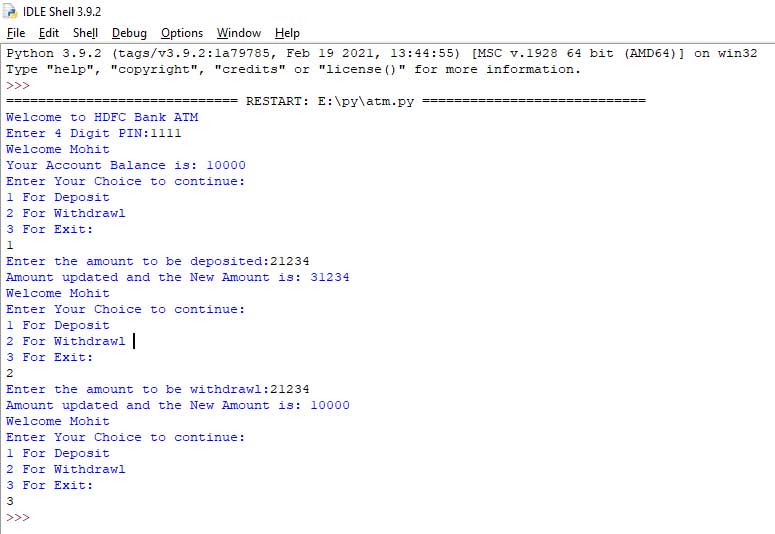
The Output:
Now Cheers !😊

Comments

Popular posts from this blog

JS: Cheatsheet

   Datatypes Difference Between Var, Let and Const Functions and its types Asynchronous operations in JS

C++: 7. Inheritance

In C++, inheritance is a process in which one object acquires all the properties and behaviors of its parent object automatically. In such way, you can reuse, extend or modify the attributes and behaviors which are defined in other class. In C++, the class which inherits the members of another class is called derived class and the class whose members are inherited is called base class. The derived class is the specialized class for the base class. Single Level Inheritance When one class inherits another class, it is known as single level inheritance. Example:-  #include <iostream>   using namespace std;    class Account {      public:      float salary = 60000;     };      class Programmer: public Account {      public:      float bonus = 5000;        };        int main(void) {   ...

Py: 2. Python Fundamentals

 Variable:-  Variable is a name that is used to refer to memory location. In Python, we don't need to specify the type of variable because Python is smart enough to get variable type.  Variable names can be any length can have uppercase, lowercase (A to Z, a to z), the digit (0-9), and underscore character(_). Syntax:-  num= 345 name= "mohit" Variable Types:- Number (Int, Float) Sting Boolean Get the Type of the variable:- x = 5 y = "John" print(type(x)) print(type(y)) Output:-  <class 'int'> <class 'str'> Operators:-  The operator can be defined as a symbol which is responsible for a particular operation between two operands. Python provides a variety of operators, which are described as follows. Arithmetic Operators:-  Assume variable a holds 10 and variable b holds 20, then − + Addition Adds values on either side of the operator. a + b = 30 - Subtraction Subtracts right hand operand from left hand operand. a – b = -10 * Multiplicat...